Authentication and authorization
PCA uses Microsoft identity and OAuth 2.0 to protect its APIs. Authentication establishes the identity of a person or registered application. Authorization then checks whether that identity has the PCA role required for the requested action.
Role-based authorization
| Request | Required access |
|---|---|
| Interactive Libraries and Search, and HTML content pages | No PCA role |
| Search API and machine-readable retrieval, including JSON, symbols, and IMF SHACL | Reader or Creator |
| Create or update supported content | Creator |
| Submit a Draft | Creator or Reviewer |
| Review submitted content | Reviewer |
Try an endpoint in Swagger UI
The quickest way to make an authorized request as yourself is the
PCA Swagger UI. Select Authorize, tick the
user_impersonation box under Scopes, select Authorize in the dialog, and
complete the Microsoft sign-in. Swagger already has the relevant client, tenant,
redirect, and delegated-scope settings for the deployed platform, so you do not need to
find or enter those values yourself.
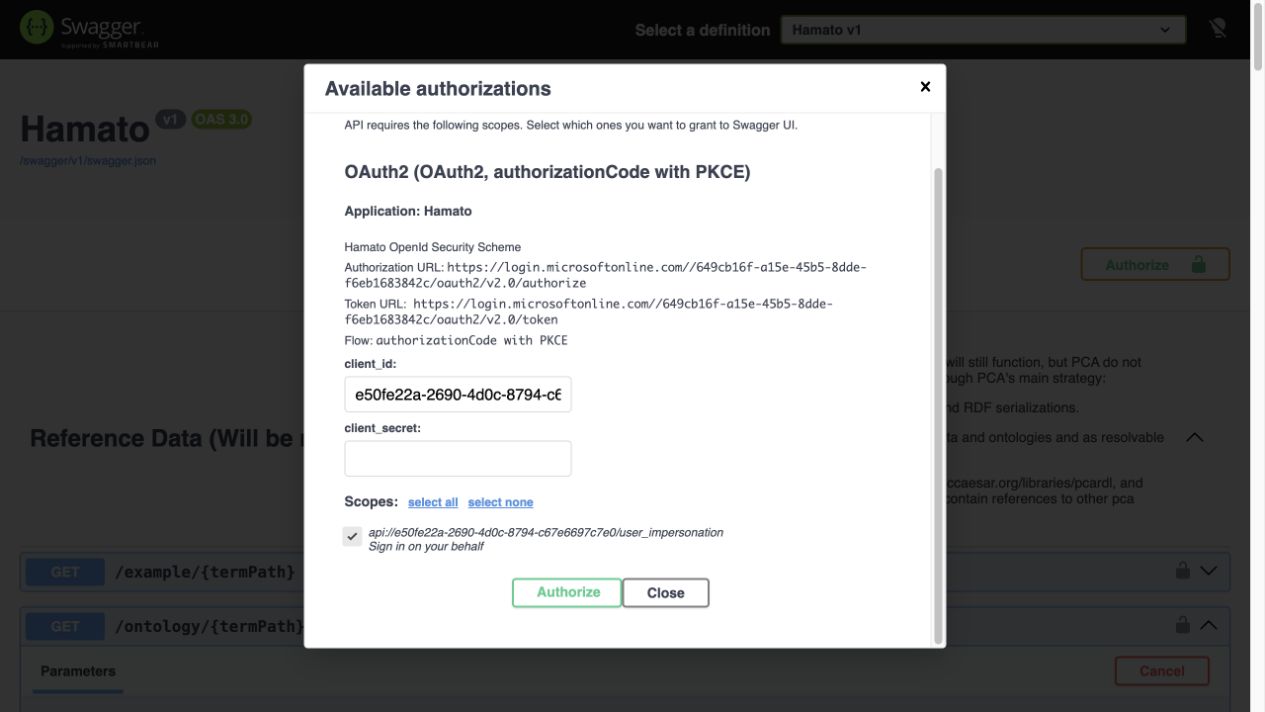
Select the delegated scope before continuing to Microsoft sign-in.
Fetch the IDO core ontology
After sign-in returns you to Swagger:
- Expand Reference Data, then expand
GET /ontology/{termPath}. - Select Try it out.
- Enter
lis14/ont/corefortermPath. - Select
3fordetailLevelto request the complete ontology. - Select
text/turtleas the response media type. - Select Execute. Swagger sends the bearer token and calls the environment where that Swagger page is hosted.
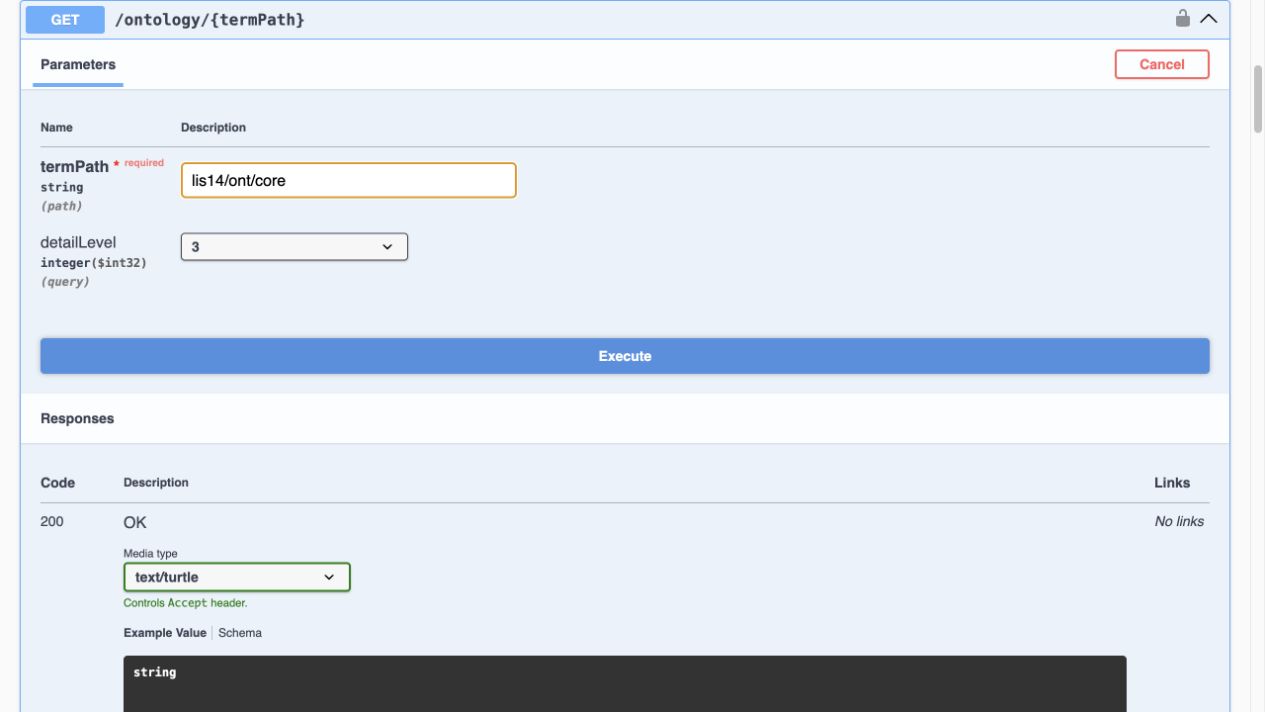
The IDO core request uses the ontology path, complete detail level, and Turtle representation.
Swagger is a convenient test interface, but it is not a complete endpoint catalogue. Some search and dereferencing routes are intentionally omitted. Use the endpoint reference to choose a supported route, then use Swagger for the request schemas it exposes.
Authorize a user in a registered client
Use delegated user authorization when a person is actively using the application and the action should be recorded under that person's permissions. The client must have a Microsoft Entra application registration, a registered redirect URI, delegated access to the PCA API, and the required consent. Contact PCA before implementation to confirm the registration and access arrangement.
- Ask PCA to provision the user and the required Reader, Creator, or Reviewer role.
- Register the client and its redirect URI, and configure the delegated PCA API permission and consent in coordination with PCA.
- Configure the client with the Microsoft identity values supplied or approved by PCA.
- Sign the user in with OAuth 2.0 Authorization Code with PKCE.
- Request the delegated
user_impersonationscope. - Send the resulting access token with each PCA API request:
Authorization: Bearer <access-token>
The token must be an access token intended for the PCA API. An ID token only describes the signed-in session and must not be sent as the API bearer token.
Authorize a registered application or service
PCA also supports registered applications that need to call the API without an active user—for example, an approved integration or background service. Contact PCA before implementation so the application can be registered and given the correct role. PCA will provide the environment-specific details, including the tenant and token endpoint, client ID, credential or certificate requirements, API application ID URI or scope, and the allowed access.
The principle is the same as for a user: obtain an OAuth access token and send it as a
bearer token. The difference is that the application authenticates with its own
credential and requests the API's .default permissions. A client-secret flow has this
general shape. Here, <protected-secret-file> is populated by approved secret-management
tooling and is kept outside source control:
curl --request POST \
  --url 'https://login.microsoftonline.com/<tenant-id>/oauth2/v2.0/token' \
  --header 'Content-Type: application/x-www-form-urlencoded' \
  --data-urlencode 'client_id=<application-client-id>' \
  --data-urlencode 'client_secret@<protected-secret-file>' \
  --data-urlencode 'scope=<PCA-API-application-ID-URI>/.default' \
  --data-urlencode 'grant_type=client_credentials'
Read the access_token from the response and use it for a PCA request:
curl --header 'Authorization: Bearer <access-token>' \
  --header 'Accept: application/json' \
  'https://posccaesar.org/<supported-resource-path>'
Do not copy a personal browser token into a service. A person's role does not transfer to an application identity; PCA assigns and governs the application's access separately. Keep the client secret or private key in an approved secret store, not in source code or the command history.
Handle tokens safely
- Request the least privilege and shortest practical lifetime.
- Acquire a new token when the current token expires; do not treat access tokens as permanent API keys.
- Keep tokens out of URLs, logs, issue reports, and source control.
- Treat
401 Unauthorizedas missing, invalid, or expired authentication. - Treat
403 Forbiddenas an authenticated caller that lacks required authorization. - Correlate failures with the response
traceIdwhen present, without sharing the token.